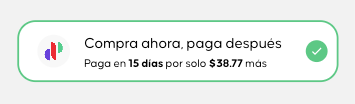
To implement the Propaga Button in the file header, you’ll need to import the global hook.
import { usePropaga } from '@propaga/react-native-sdk';
And here’s how you can use the hook:
const MyAwesomeComponent = () => {
const { ... } = usePropaga();
return ( ... );
}
You can easily implement a ready-to-use checkout button like this:
With the following snippet, implementing the button becomes straightforward:
import { useState } from 'react';
import { View, Button } from 'react-native';
import { usePropaga } from '@propaga/react-native-sdk';
export default function App() {
const [isPropagaActive, setIsPropagaActive] = useState(false);
const { PropagaButton } = usePropaga();
return (
<View style={styles.container}>
<PropagaButton
totalAmount={2000}
isActive={isPropagaActive}
cornerStoreId="...."
token={'...'}
onPress={() => {
setIsPropagaActive(!isPropagaActive);
}} />
</View>
);
}
This button is designed to display a checked state, ideal for use as a component on your check-out screen.